
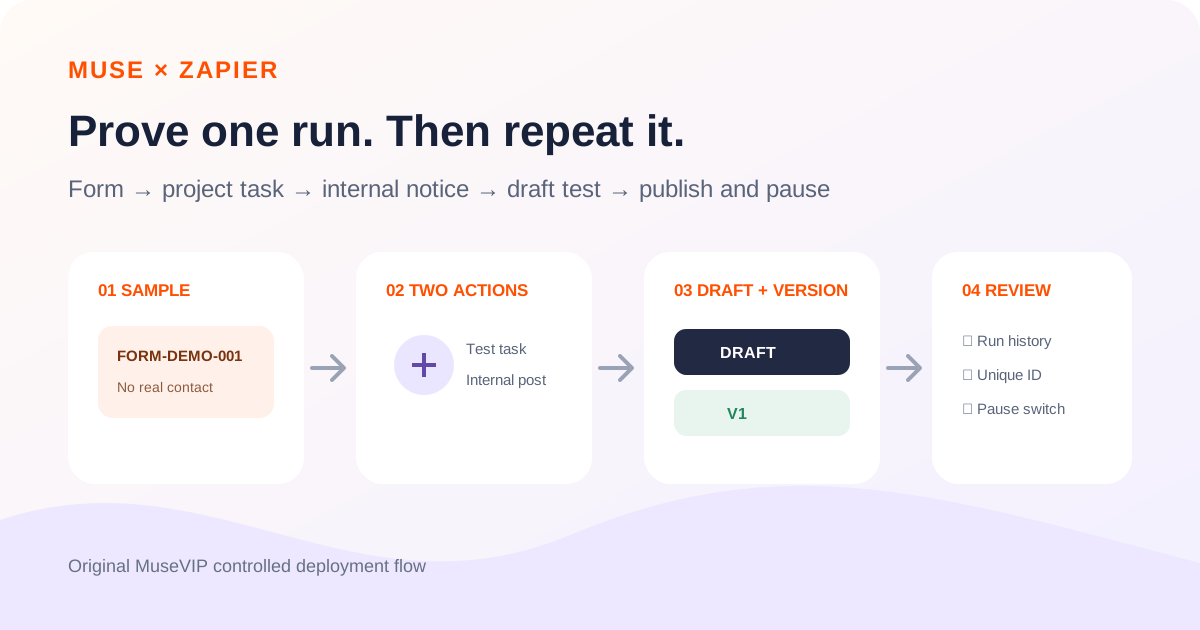
This guide focuses on “Muse Zapier workflow” and turns the question into practical steps you can check.
01 | Separate an action now from a trigger that keeps running
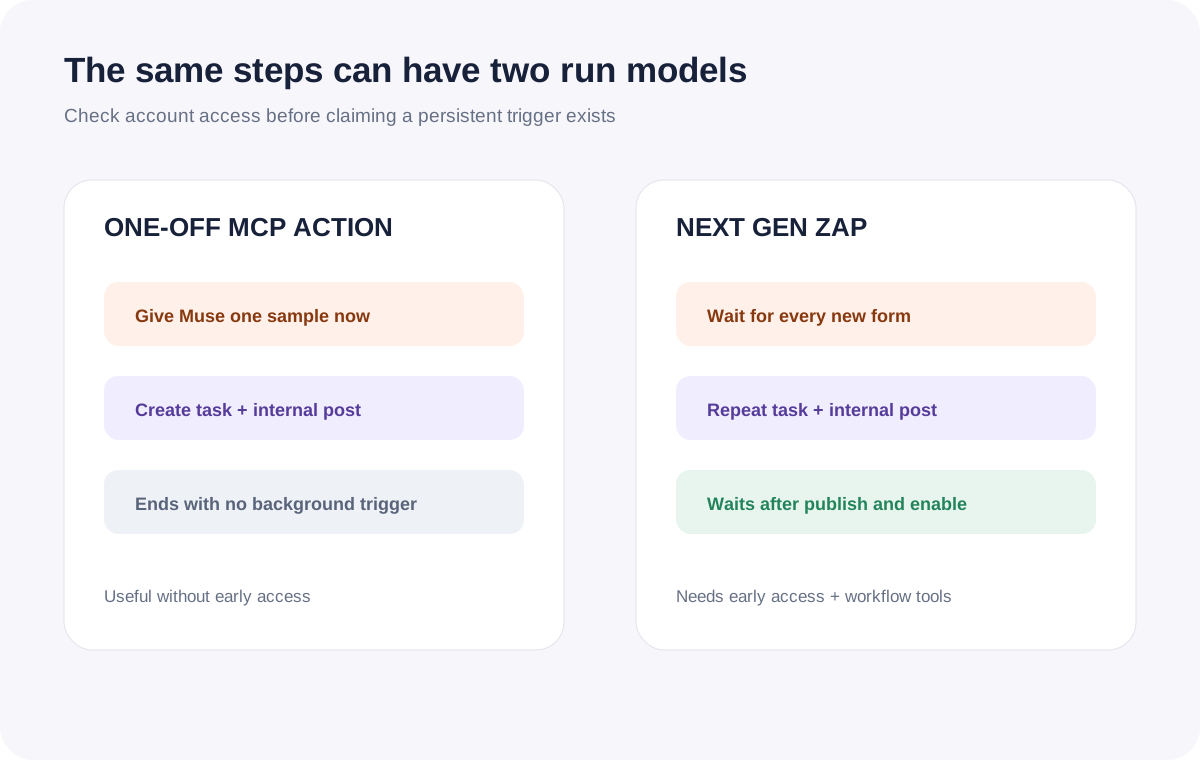
Muse can handle the form in front of you, create one project task, and post its link in an internal Slack test channel. That conversational action ends when the request is done. A future form will not repeat the sequence unless you build, publish, and enable a triggered workflow.
Zapier confirmed on September 29, 2026 that it is a named connector inside Muse. Once authorized, Muse can use the apps and actions you approve through Zapier MCP. Zapier describes a path from an action an agent can take today to a repeatable workflow for tomorrow.
The official social image is a Zapier-themed Muse character. It contains no form, task, Slack message, account, or result. The workflow below comes from current Zapier documentation and does not claim a run in your account.

02 | Check whether your account has Next Gen Zaps access
Standard Zapier MCP can run one-off actions in the current conversation. Building and deploying a durable workflow through an MCP client requires Next Gen Zaps. Zapier currently labels it request-only early access for Professional, Team, and Enterprise plans, with limited availability and active development.
After authorizing Zapier in Muse, ask for the current account, server mode, approved apps and actions, and the availability of workflow tools. Zapier’s documented setup uses the zapier:build-workflows skill to confirm early access and install the required tools. Zapier also says skills are unavailable in Managed mode, so a server cannot remain locked to Managed mode while silently assuming the build skill ran. A sequence of one-off calls is not a deployment when workflow tools are absent.
Without access, the first half of this guide still works. Run a single controlled sample and review the field mapping. For a recurring version, build a classic Zap in Zapier’s editor until the account receives Next Gen access.
03 | Write a small trigger and destination contract
Use a low-risk path: a new test-form submission creates a task in a test project and posts the task link to an internal Slack test channel. Name the exact app connections, project, and channel. Leave customer email, bulk messaging, and public channels out of version one.
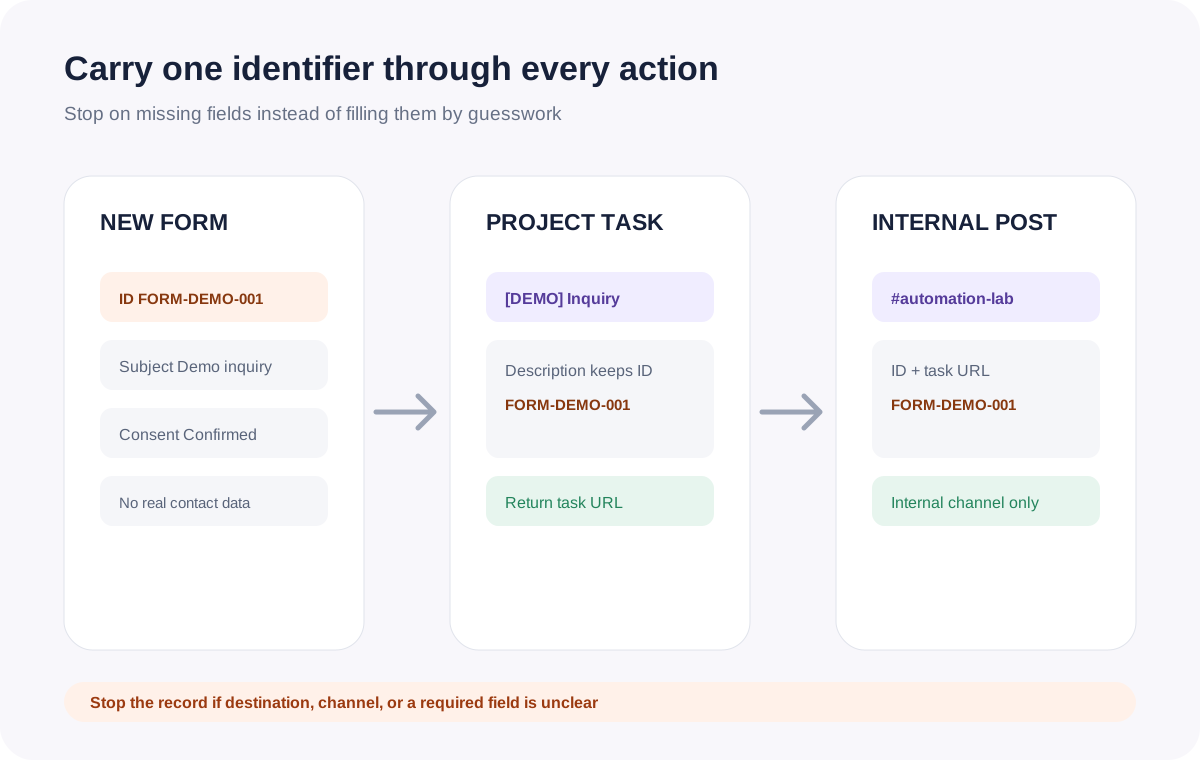
Specify input fields, required checks, project destination, task title and description templates, Slack channel, message template, and a unique submission ID. Use FORM-DEMO-001 for the first sample and include it in both outputs. Missing subject, consent, or required owner data should stop that record.
New Zapier MCP servers default to Agentic mode, where the agent can discover and enable actions. Managed mode lets you choose a fixed tool set in advance. Use Managed mode for the one-off sample with only project-task creation and internal-channel messaging. The documented Next Gen build skill requires an early-access Agentic setup, so use a separate low-risk test server or approve that mode change explicitly. Zapier calls it Managed mode, which should not be confused with an informal “manual mode” label.
04 | Prove the mapping with one synthetic record
Before creating a persistent trigger, ask Muse to run one sample with no real customer data. Use the name “Demo inquiry,” ID FORM-DEMO-001, and the note “automation check only.” Send it to a test project and the internal #automation-lab channel.
Require an action list and connection names before execution. It should create one test task, obtain its URL, and send one internal test message. After approval, return the task ID, URL, Slack message URL or timestamp, and the status of every action. Stop on a connection or field mismatch.
This is ordinary Zapier MCP usage, not a trigger. Zapier currently charges two tasks for each successful MCP tool call and none for a failed call. If the run makes exactly two successful calls, task creation and message sending consume at least four tasks. Searches, reads, and updates add their own calls.
05 | Build the same contract as a draft
After the one-off sample checks out, move to an early-access Agentic test server and ask Muse to create a Next Gen Zap draft. Use a new-form-submission trigger, a project-task creation action, and an internal Slack message action. Map the submission ID into both outputs, retain the reviewed test connections, and list the workflow tools enabled for this build. Do not add email, CRM changes, or an external notification.
Next Gen changes begin in a draft, and MCP publishing always goes through a draft. Request the Workflow Manager URL, draft name, trigger, connections, and field mapping. Open the workflow and inspect the trigger, Inputs step, and both actions.
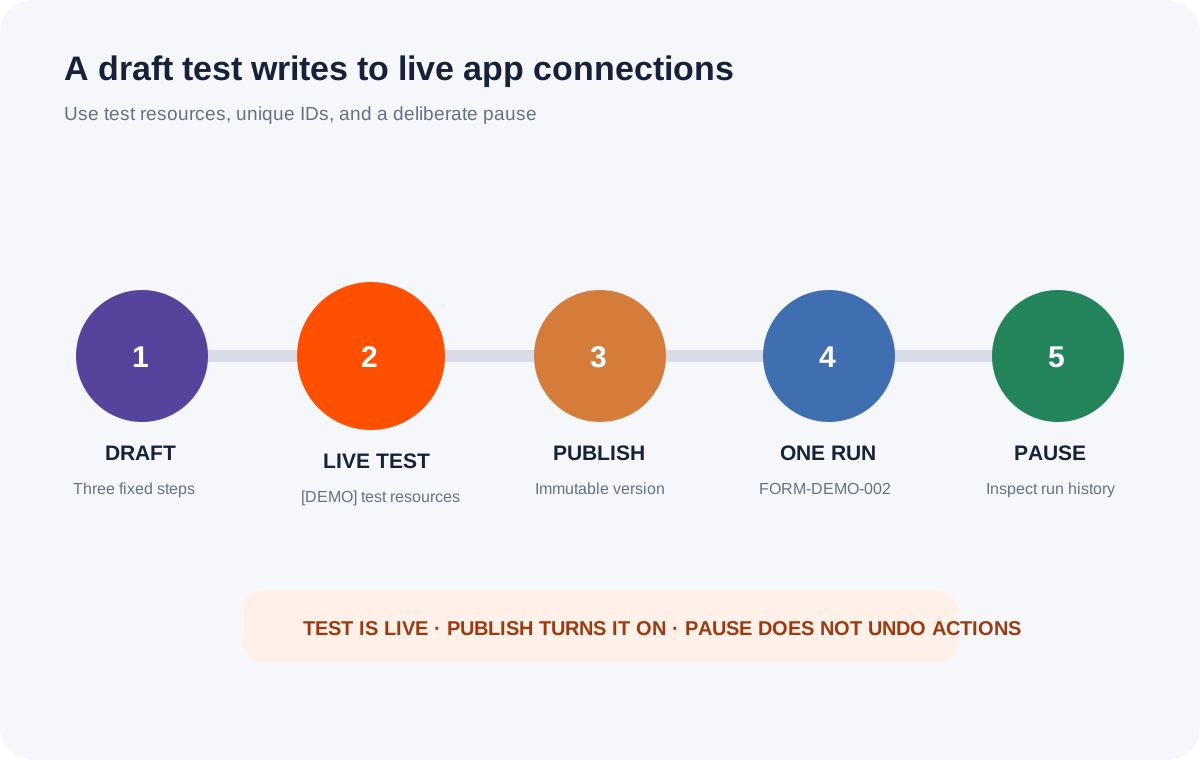
A draft test runs against live app connections. Zapier explicitly says it is not a sandbox. Prefix every test value with [DEMO], use a test project and internal test channel, and confirm that one task and one message are the only live effects before running it.
06 | Inspect run history, duplicates, and task math
After the draft test, inspect the Workflow Manager run list, the task system, and Slack. FORM-DEMO-001 should appear once in all three. Record run ID, task ID, message URL, and workflow version. Deleting a completed history item does not undo an action that already happened.
Zapier lists broad triggers, multiple workflows watching the same event, loops, static test values, and timeout replays as common duplicate causes. If the ID appears twice, turn the workflow off and investigate the runs. Do not replay the whole workflow casually: a full replay executes successful steps again and incurs fresh task usage.
Keep the billing models separate. As of October 1, 2026, building, testing, publishing, and running Next Gen Zaps are unbilled during early access. Zapier says future billing will count each successful app action and fetch call while logic such as filters, formatting, loops, and branches will not use tasks. This two-action example would normally become two tasks per submission before optional AI or fetch calls. Ordinary MCP tool calls continue to use two tasks per successful call.
07 | Publish one version and allow one controlled trigger
Publishing a draft creates an immutable version and turns the workflow on. Give it a clear version name such as v1-demo-form-to-internal-task. Confirm that the form, project, and Slack channel still point to test resources before publishing.
Submit exactly one new demo record, such as FORM-DEMO-002. Wait for the run, then check the task, link, internal message, version, and status. Move to production resources only after that second result is correct. Connection or mapping changes belong in a new draft, followed by another test and a new version.
Turn the workflow off after the review. Workflow Manager has a workflow on/off toggle, and MCP workflow tools include a disable action. Turning it off blocks new triggers; it does not undo work already in progress or delete created records. A one-off MCP action has no background trigger and therefore no separate pause control.
08 | Copy a prompt with explicit stop points
Replace the bracketed resources with your own test connections. The first request should stop after a plan and one approved sample.
Use the Zapier connection currently authorized in Muse. First list the Zapier account, server mode, available app connections and actions, and whether this account has Next Gen Zaps early access and workflow tools. Use only 【test form connection】, 【test project connection】, and 【internal Slack test connection】. Return a plan before running anything. The sample is FORM-DEMO-001, named Demo inquiry, with no real contact data. Allow only one task in 【test project】 and one message with its URL in 【#automation-lab】. Show field mappings, connections, expected tool calls, and task usage, then wait for approval.
After I explicitly approve the one-off sample, run those two actions and return the task ID, task URL, Slack message URL or timestamp, action status, and Zapier MCP History record. Do not email the submitter, edit a CRM, create another task, or enable a recurring trigger.
If the sample passes and the account has Next Gen access, build the same mapping as an unpublished draft. Trigger on a new submission from 【test form】, create one task in 【test project】, and notify 【internal test channel】. Put the submission ID in both outputs. Return the workflow URL, draft, connections, and mapping before approval. A draft test uses live connections, so it must not touch production resources.
After a successful test, wait again before publishing. Publish one named version, submit only FORM-DEMO-002, verify one run and one copy of each output, then turn the workflow off. Stop on duplicates, missing fields, changed connections, or permission errors. Do not replay the whole run. For dependency review after tasks accumulate, use the <a href="/en/guides/muse-asana-blocked-tasks/">Asana blocked-task guide</a>. For an operating summary, use the <a href="/en/guides/muse-small-business-weekly-brief/">weekly business brief</a>.
References
These sources support the product information in this guide. Musevip is an independent publication and is not affiliated with Meta.
- [1] Zapier: Connector inside Muse
- [2] Zapier Help: What is Zapier MCP?
- [3] Zapier MCP: How tools work
- [4] Zapier MCP: Usage and billing
- [5] Zapier Help: Get started with Next Gen Zaps
- [6] Zapier Help: Workflow Manager
- [7] Zapier Help: Next Gen Zap drafts and versions
- [8] Zapier Help: Duplicate data troubleshooting
- [9] Zapier Help: Zap history