

This guide focuses on “Muse Slack” and turns the question into practical steps you can check.
01 | Find the question that got buried
Someone asks a question, a few people see it, and the next wave of messages pushes it out of view. Give Muse one channel and a short date window, ask it to collect possible open questions, then check the original threads and confirm who will follow up.
Meta announced the Slack connector on September 29, 2026, and Slack lists the Muse app in its Marketplace. The available scope depends on your workspace authorization. Public documentation does not promise a complete scan of every unanswered message; this workflow produces candidates for review.
This guide focuses on Slack threads, items awaiting a reply, ownership, and source location. For email and calendar actions, see Muse’s email and calendar daily brief. For cross-tool business reporting, see Muse’s weekly small-business brief.
02 | Start with a small scope
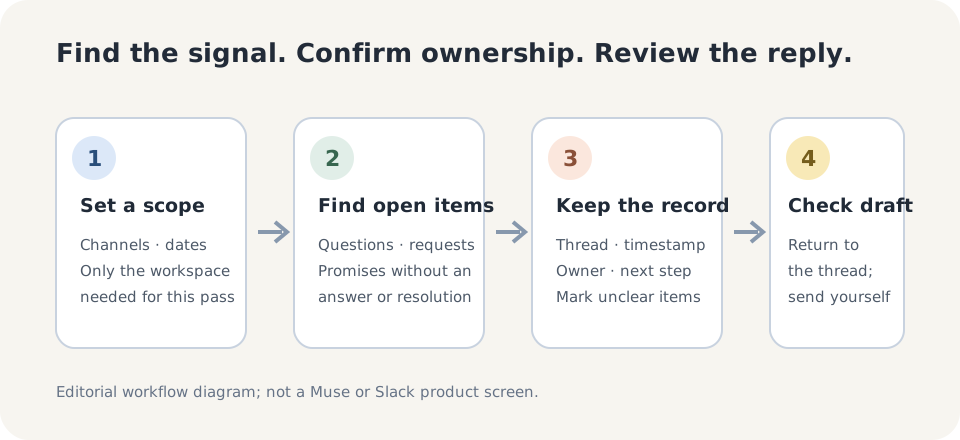
Do not begin by asking Muse to summarize an entire workspace. Choose one channel you are responsible for and a clear date window, such as the last three workdays. If several teams or customer channels are involved, start with one. Before connecting, read the Slack authorization details, confirm that your workspace permits the app, and check the data access the page actually lists. Someone else’s screenshot does not prove that your account can read private channels, old messages, or every thread.
Narrow the scope further for customer, personnel, financial, or security conversations, or use redacted examples. Do not copy a whole private discussion somewhere else just to try the feature. If the authorization page does not match the task, stop and manually select a few non-sensitive threads instead.
03 | Keep a source and an owner with every candidate
It is easy to mislabel an item as unanswered. Someone may have replied in another thread, the question may be stale or withdrawn, or the message may not require follow-up. Ask Muse to flag candidates first, rather than declaring that each one was missed.
A reviewable row should include the channel, a link to the original message or thread, timestamp, a short description of the question or commitment, the latest visible reply, the next owner, the suggested next step, and any uncertainty. If Muse cannot find a reliable link, ask for the channel, date, and enough context to locate the message in Slack. It should not invent a URL, author, or missing context. If ownership is unclear, mark the item unclaimed instead of assigning it based on who spoke last.
A team can borrow a simple convention from Slack’s own triage guidance: collect requests in a designated triage channel, agree on reactions for pending or claimed work, continue the conversation in its thread, and appoint someone to watch new requests. Teams choose their own channel names, reactions, and routines; these are not fixed Muse buttons.
04 | Adapt this prompt to your channels
Replace the brackets with the actual channel and dates. Ask for organization and drafts only; do not authorize sending or promises.
- Review only the Slack workspace, channels, and messages you are currently authorized to access: [channel names], from [start date] to [end date and time zone]. First tell me which channels, messages, and date range you can actually read. List anything inaccessible; do not guess.
- Flag only candidate questions, requests, explicit commitments, or items that may still be waiting for a reply. Include the channel and original message or thread link. If there is no reliable link, give me the date and context clues I can use to find it in Slack. Do not reproduce entire private conversations.
- For each item, show the latest visible reply, current status, possible owner, and next step. Mark insufficient evidence as needs review, unclear ownership as unclaimed, and a possibly resolved item as status uncertain. Do not fill in missing facts.
- You may draft a short reply and explain which part of the original question it addresses. Organize and draft only. Do not send a message, mention anyone, edit channel content, create a task, or make a commitment on the team’s behalf. Show the complete draft and source for my review.
05 | Verify each item in its original thread
Open the original thread for every high-priority candidate. Confirm that the message exists, the date range is right, a later reply has not already resolved it, and nobody has taken ownership elsewhere. Check the proposed owner and next step. If the team has no ownership rule, ask someone to claim it; do not automatically treat the last person who spoke as the owner.
Check every draft against the conversation for tone, facts, and commitments. Remove unsupported dates, prices, progress claims, or solutions. If a reply depends on a customer record or another system, verify that source before keeping the draft. The person responsible should review and send it from the original Slack thread.
Sample a few items marked complete and a few marked open. If Muse calls a resolved thread unanswered, refine the rule. If it misses a thread, add it manually and check whether channel permissions, dates, or inaccessible replies explain the gap. A spot check only tells you about that small sample; it does not prove that every workspace message was scanned.
06 | Use a Slack triage convention for recurring requests
When the same requests keep returning, make the team’s process explicit in Slack: what needs follow-up, who claims it, when it is reviewed, how it is marked resolved, and where durable decisions are stored. Slack’s guidance recommends triage channels, clear priority markers, thread replies, and a rotating triage captain to make ownership visible. Whether requests are also copied into a ticket or project system is up to the team’s existing process.
Muse can help draft a checklist or candidate summary, but do not mistake a one-off prompt for continuous monitoring. Unless your account explicitly offers and explains a scheduled capability, its scope, and permissions, treat each run as a manual review.
07 | Narrow down the problem when the result is wrong
- Almost no results: confirm the target workspace is connected, the channel names and dates are correct, and your account can access the messages.
- A thread reply is missing: check whether Muse can read the thread context. If it cannot, ask the owner to verify the original link rather than expanding permissions blindly.
- Resolved items appear open: ask Muse to check the latest visible reply and separate uncertain statuses.
- The wrong person is assigned: switch the row to unclaimed and ask the team to use its rotation or responsibility list instead of inferring ownership from who spoke.
- A draft uses stale or sensitive information: do not send it. Check the thread and retain only the information needed to answer.
08 | Treat the result as a sourced human review
The useful output is not an AI summary that merely looks complete. It is a short list of pending items that link to their source, show who should pick them up, and can be checked. Start with a brief time window and a few channels, then adjust the team’s convention after several review cycles.
If every customer request needs an owner, status, due date, and reminder, let a Slack workflow or the team’s existing ticket system own that record. Muse’s connector can serve as an assisting entry point; public documentation does not establish that it replaces a dedicated queue or automatically prevents missed messages.
References
These sources support the product information in this guide. Musevip is an independent publication and is not affiliated with Meta.
Last reviewed 2026.10.01. Product pages may change.