
This guide focuses on “Muse ad reporting tutorial” and turns the question into practical steps you can check.
01 | Ask for a reconciliation table first
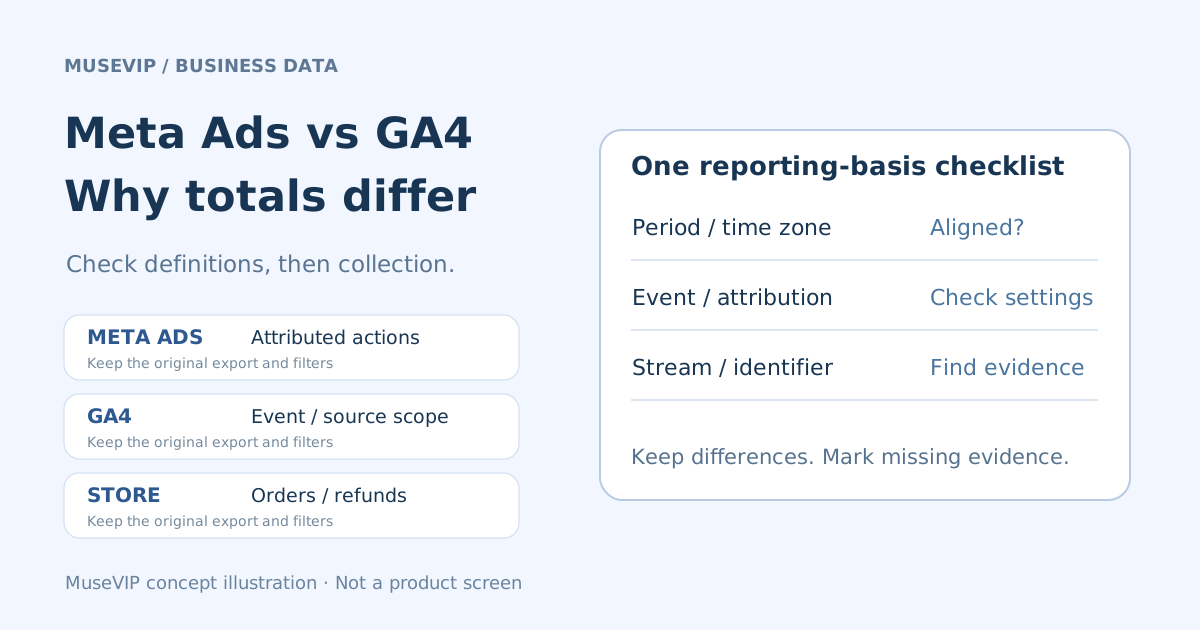
Attributed purchases in an ad report, GA4 purchase events, and completed store orders answer different questions. Start by asking Muse to document each number’s source and definition. A useful first deliverable is a difference table with missing evidence clearly marked.
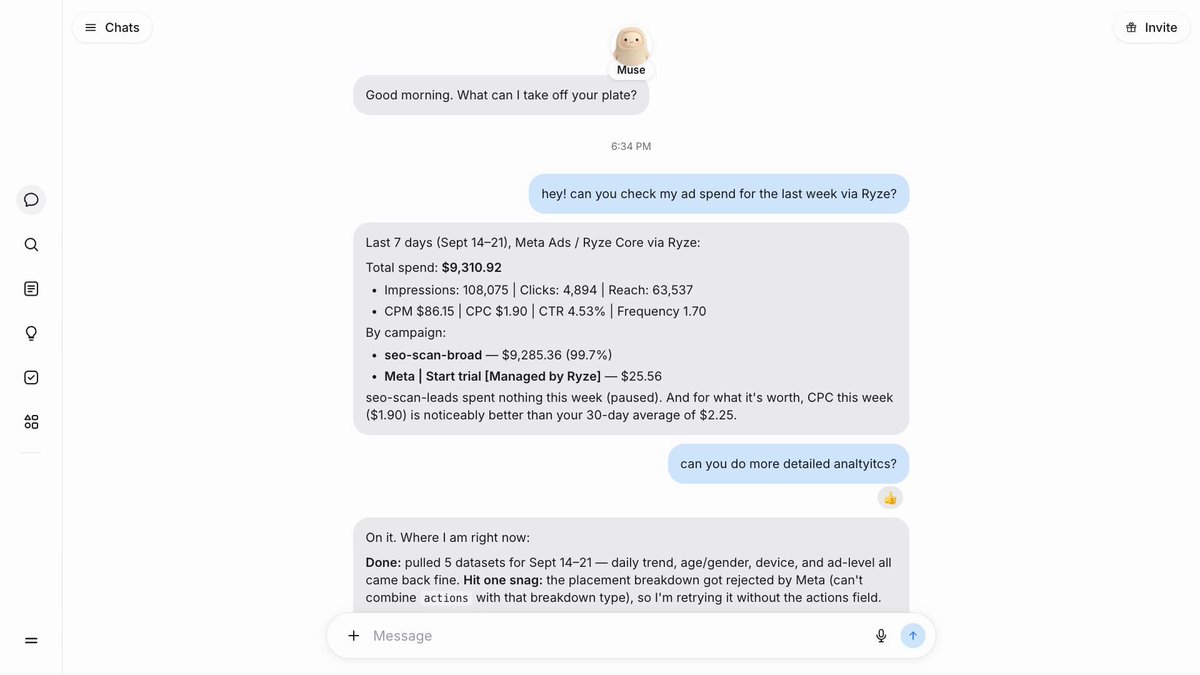
On September 21, @korzhov_dm shared a Muse ad-spend analysis screen. This tutorial compares that example with Google’s attribution, processing, and transaction-ID documentation. The image explicitly says “via Ryze,” identifying the creator’s third-party route. The post’s claimed savings and repairs are not results promised by this guide.
The conversation also reports a restricted placement-breakdown query. Record an unavailable breakdown as a gap. Receiving an account total does not establish that every ad or placement was inspected.
02 | Identify the account and data route
Meta’s September 29 business announcement describes connecting Meta ad accounts. Inspect the connector and authorization actually available to you, then verify the ad-account ID, store, and GA4 property. Check native ads access, a third-party service such as Ryze, and the GA4 source separately.
Keep this task read only. Do not ask it to change budgets, pause ads, edit the site, or backfill events. If GA4 access is unavailable, export reports you are entitled to use and supply the column names and export conditions. Keep campaign or ad identifiers while removing unnecessary customer information.
Request a source inventory showing each available table, covered dates, refresh time, and missing fields. Distinguish unavailable data, empty cells, and a genuine reported zero. Unknown values remain unknown.
03 | Use a completed period and record the reporting basis
Choose a completed period with explicit start and end dates. Record each report’s time zone before comparing daily rows. Two exports both labelled “last week” can still have different boundaries around midnight.
Google says GA4 processing can take 24–48 hours and reports may change during processing. Key-event attribution credit can continue to be adjusted after recording. Save the extraction time with each file and use the same date range for a later recheck rather than treating yesterday’s first export as final.
Document currency and amount definitions separately. Check whether purchase values include shipping or tax and whether the store export deducts refunds. Total store sales divided by ad spend does not automatically describe one campaign’s attributed ROAS or its profit.
04 | Name the conversion and attribution conditions
In Ads Manager, record the report column and its actual attribution settings, including the displayed click or view window. With an API or third-party export, request the query conditions too. Meta’s official SDK separates action_attribution_windows from action_report_time; a date range alone does not describe the whole request.
For GA4, identify the event, such as purchase, and whether the figure is an event count, transaction count, or key-event credit assigned to a source. Record the current reporting attribution model and lookback window. A column titled “conversions” is insufficient context.
Ask Muse to place the definitions side by side and identify what can and cannot be aligned. Preserve the current account settings while investigating. Changing attribution just to make totals appear closer changes the question being measured.
05 | Check the scope of the GA4 source dimension
First user source, Session source, and event-scoped Source describe acquisition at different scopes. Google explains that the selected reporting attribution model affects event-scoped traffic-source reporting, while user- and session-scoped dimensions are unaffected by that model setting.
A Session source report therefore cannot establish how much final purchase credit a campaign receives under event attribution. Write the complete dimension name, scope, and metric in the reconciliation. Data-driven attribution can allocate fractional key-event credit; a decimal share is not a count of actual order identifiers.
06 | Investigate tracking with specific evidence
After localizing the discrepancy to a date or campaign, inspect the UTM values received at the final landing page. Google’s manual-tagging guide describes fields including utm_source, utm_medium, and utm_campaign. Have an authorized person follow the real ad destination through redirects and record whether the parameters survive. A tagged URL pasted in chat does not verify the final request.
For suspected duplicate purchases, provide a small de-identified extract containing the transaction identifier, event name, time, stream, and amount. Ask Muse to mark candidate duplicate rows. Google’s transaction-ID deduplication documentation covers web streams. IDs must identify individual orders, must not be empty, and must omit personal identifying information; do not reuse them across different users.
Treat these as investigation clues. GA4 transaction_id is not a universal substitute for another platform’s deduplication fields. Removing duplicate rows from a spreadsheet does not repair collection. Any tracking-code change needs a separate owner and verification procedure.
07 | Separate explained differences from open investigations
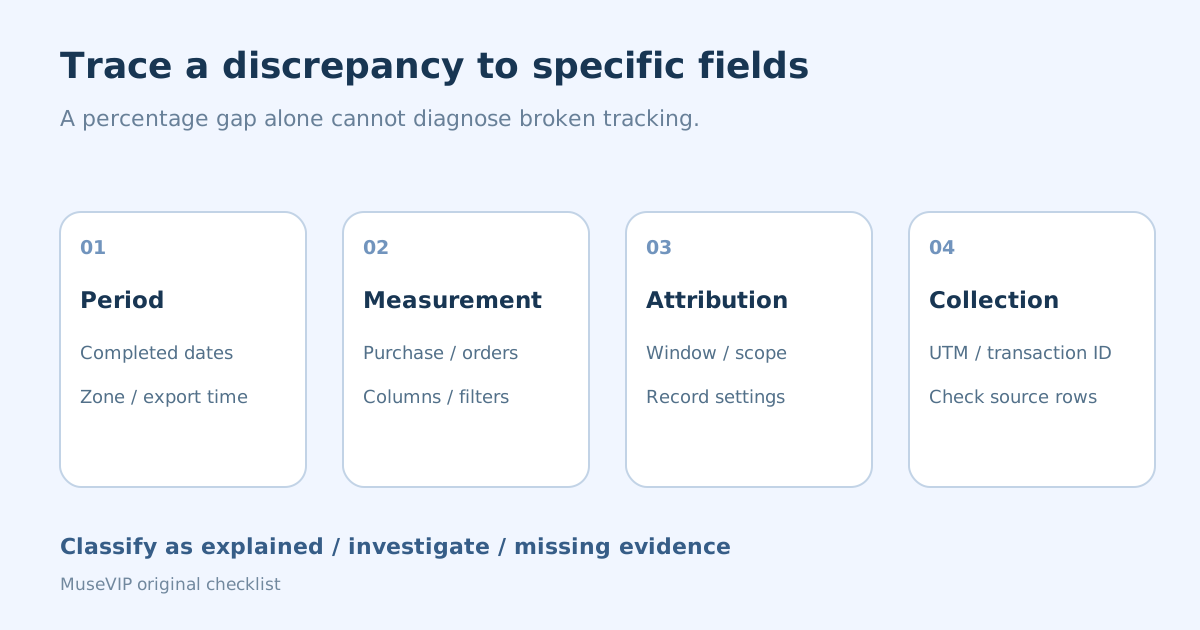
Try this brief. Use only the supplied exports. Align the accounts, completed date range, time zones, and currencies. List original metric names, source tables, and filters. Classify differences as explained reporting definitions, suspected collection issues, or missing evidence. Attach the supporting row or report reference. Do not change accounts, budgets, tracking code, or historical events.
Spot-check the returned claims against the original files. For “no purchases,” open the campaign report with the same definition. For “duplicate orders,” check whether one order was transmitted again or whether the records represent separate transactions. Each conclusion needs a traceable supporting record.
A percentage difference alone cannot diagnose broken tracking. Unaligned windows, incomplete evidence, and a collection defect require different responses. This tutorial does not use a universal 10% failure threshold.
08 | Recheck under the same conditions before taking action
Save the original reporting basis, extraction times, fields, and attribution settings. For processing delays, retrieve the same period again at an agreed time and record which differences changed. If evidence points to collection, assign it to the site or analytics owner and verify new events after a controlled fix.
Pausing ads, adjusting budgets, deploying code, and uploading historical events are separate actions to review. The creator’s analysis does not approve them for your account. Finish this reconciliation with the original exports, a difference table, and named owners for unresolved work.
Continue with the <a href="/en/guides/muse-small-business-weekly-brief/">business weekly-brief guide</a> to use the findings in a review. For repeated checks, use the <a href="/en/guides/muse-ongoing-task-progress/">ongoing-task guide</a> to set a cadence and stopping condition.
References
These sources support the product information in this guide. Musevip is an independent publication and is not affiliated with Meta.
- [1] Meta Muse business connectors announcement
- [2] Meta connector authorization guide
- [3] Google Analytics attribution settings
- [4] Google Analytics traffic-source scopes
- [5] Google Analytics data freshness
- [6] Google Analytics transaction-ID deduplication
- [7] Google Analytics manual tagging
- [8] Meta official SDK reporting fields