
MUSE RADAR / EVENT BRIEF
OpenAI Plugins Are More Than Connectors: Separate Skills, Apps and Access
OpenAI's updated guidance separates reusable instructions, connected apps and interactive extensions. Installing a plugin does not authorize its data access or make every feature available everywhere.
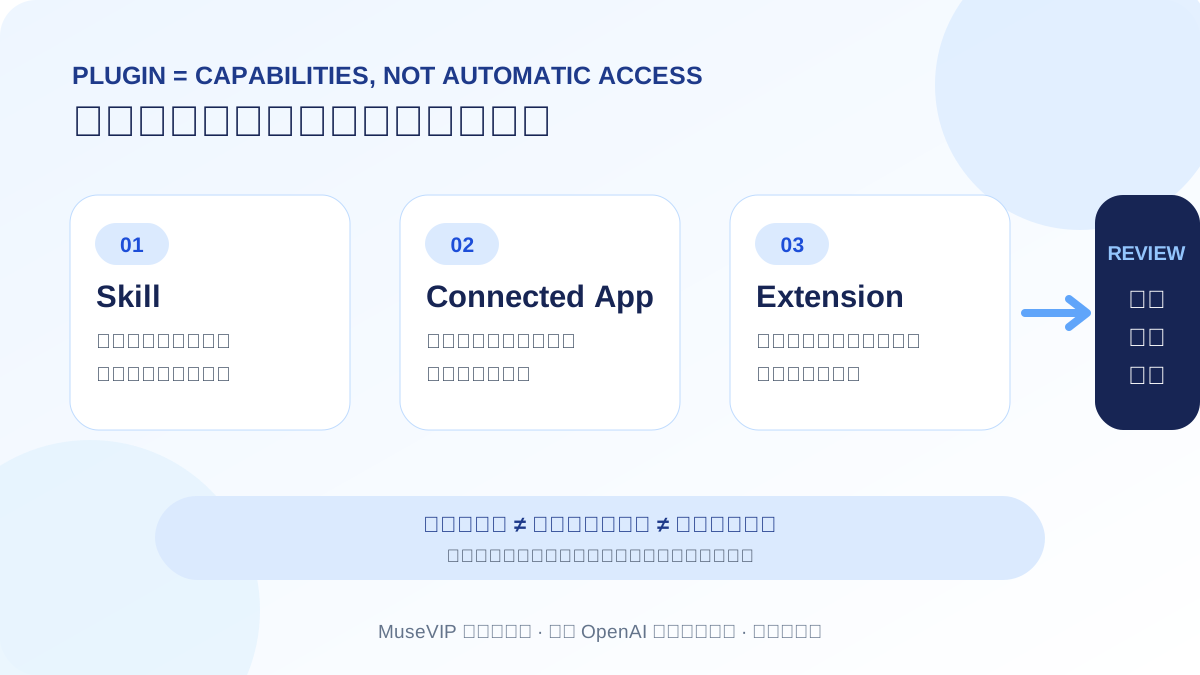
A plugin can package three different layers
OpenAI announced expanded plugin capabilities on September 29, and its help guidance updated within the past day makes the structure clearer. A Skill carries reusable instructions, a connected app provides external information or actions, and an extension adds surfaces such as sidebar panels, in-conversation views or file viewers. A plugin can also include an app template for administrator setup.
Installing a plugin therefore means installing a capability package. It may contain only a Skill, or it may still require Slack, Drive or another service connection. Some interactive features remain limited by plan, role, region and product surface.
Start with a read-only weekly brief
Turn an existing weekly-brief format into a Skill and connect only one or two necessary sources. Ask for changes, original records, missing information and at most three decisions. Do not send or change anything in the first run.
This lets you inspect each layer separately: whether the Skill followed the format, what accounts and fields the app could actually read, and whether an external action stopped for human review.
Installation, connection and authorization are separate
OpenAI says plugin installation cannot bypass provider authorization or workspace permissions. A connected app can access only what the relevant provider account is allowed to access. Plugin installation controls and app data controls remain separate.
Managed workspaces may also control plugin use, upload, MCP creation, sharing and workspace publication independently. A disabled optional app may leave Skill-only behavior available; when a required app is unavailable, the related workflow cannot complete.
Automation and marketplace sync have their own limits
Plugins can be used in scheduled tasks, and some support event triggers. Not every plugin supports events. Review the event, conditions, connected account and allowed actions instead of treating scheduled execution as broader authorization.
Workspace administrators can import a GitHub plugin marketplace and sync it daily. Directory and sync results can lag, so check the plugin detail and its source when a specific version matters.
The platform direction is clear; acceptance checks still matter
Developer Simon Willison described plugin extensions in his DevDay notes as a move toward full applications that feel native to ChatGPT and Codex. That is an individual interpretation, not proof that every plugin already has a full interface or works across every surface.
Our linked Skills, MCP, Zapier and weekly-brief guides provide separate checks for instructions, tools, automation and output. We will update this event if plan access, desktop limits or workspace permissions change.
Source notes
Event date and our publication date are shown separately. Community reports describe individual experiences.