
MUSE RADAR / EVENT BRIEF
OpenAI Puts Async Tools, Multi-Agent Work and Skills Into One Production Playbook
OpenAI's October 2 guide connects model choice, lean Skills, asynchronous tools, multi-agent delegation, computer use and human decision boundaries. The useful pattern is to run independent work early, wait for dependencies and keep consequential choices reviewable.
The update is a layered method, not another automation button
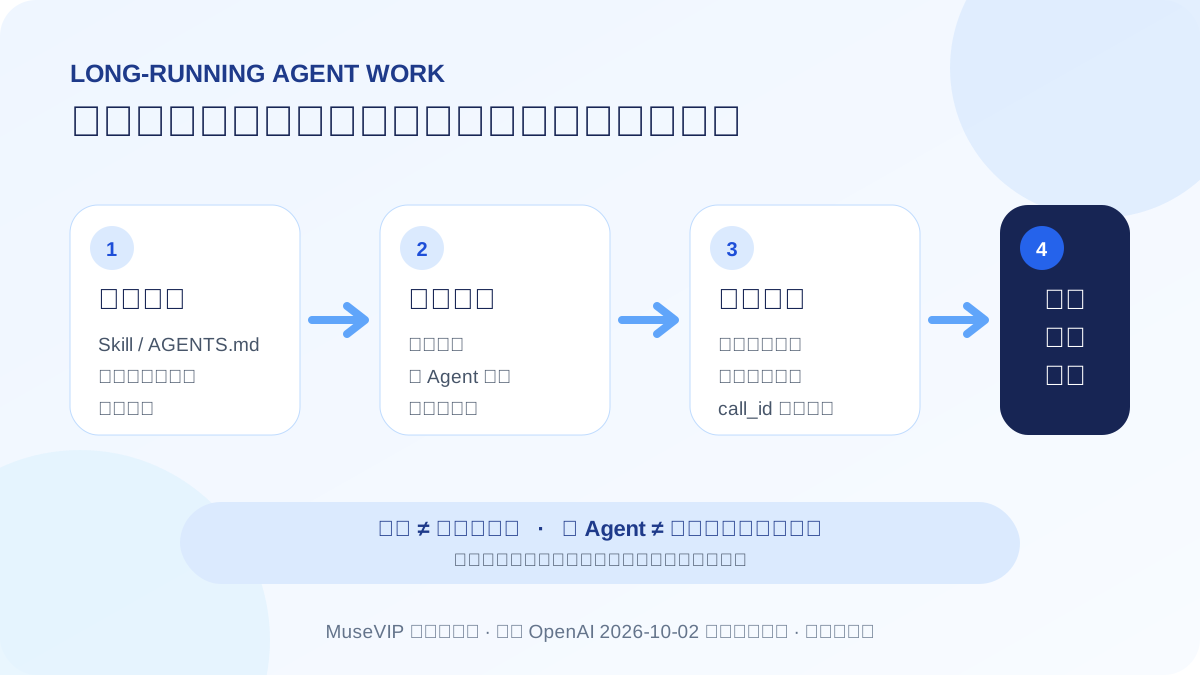
OpenAI's October 2 production guide brings several previously separate practices into one workflow. Stable guidance belongs in a Skill or AGENTS.md, slow tools can run asynchronously, independent investigations can be delegated, and computer use is reserved for steps that genuinely need a screen. The guide also asks teams to define which choices the agent can make and which require a person.
In practical terms, one agent should not block an entire job from start to finish. Research, tests and option reviews can overlap. A dependent step must still wait for its result, while production data changes, scope decisions and external sends remain review points.
Slim down existing Skills before adding parallel work
OpenAI's developer guidance warns that too many Skills, long descriptions and overlapping triggers make it harder for the agent to select the right instructions. Keep the description short and explicit about when the Skill applies, then load detailed procedures, templates and references only when needed.
Use AGENTS.md for project-level rules: which documents and tests matter, which safe local checks are authorized, and which actions require approval. Turning every possibility into a mandatory recipe wastes context and can make stronger models less effective.
Async tools do not move execution to OpenAI
The official documentation says that marking a tool async lets the model continue independent work while your application runs the slow operation. Your application still executes the tool and returns the result in a later Responses request using the original call_id. This is different from Background mode, which makes response generation asynchronous.
A sensible use is to start several read-only lookups, then organize evidence already available. If the next decision depends on a lookup, the workflow must wait for that output; asynchronous does not mean optional.
Multi-agent is still beta, so begin with separable read-only tasks
GPT-6.1 Sol can delegate independent work to subagents in the Responses API and combine their findings. OpenAI labels the capability beta and notes that schemas may change. Good first uses include investigating different parts of a codebase, checking separate sources or comparing candidate plans—not having several agents modify the same production record.
Review more than the final prose. Keep the subtask scopes, tool outputs, failures and the main agent's merge rationale, then check for duplicated work, contradictions and missing asynchronous results.
A useful workflow to try now
For a weekly operating brief, use one Skill to define the output, two read-only subtasks to inspect orders and content performance, and async tools for slow queries. The main task can organize last week's conclusions while those queries run, then merge their outputs when ready. Sending messages, changing inventory or expanding scope still waits for approval.
Use our reusable Skills guide for instructions, the MCP guide for tool permissions, the ongoing-task guide for checkpoints and the activity-log guide to review what the agent actually did. Together they make failures easier to locate than enabling every automation at once.
Source notes
Event date and our publication date are shown separately. Community reports describe individual experiences.