
MUSE RADAR / EVENT BRIEF
Codex Can Predict Your Next Instruction—Tab Accepts the Text but Does Not Send It
OpenAI added Composer predictions to the Codex desktop app in beta on October 9. It proposes a complete next message from the current thread, but the user must accept, review and send it. Access is currently limited to adult personal Pro users in local or SSH threads with GPT-6 Astra or GPT-6.1 Sol.
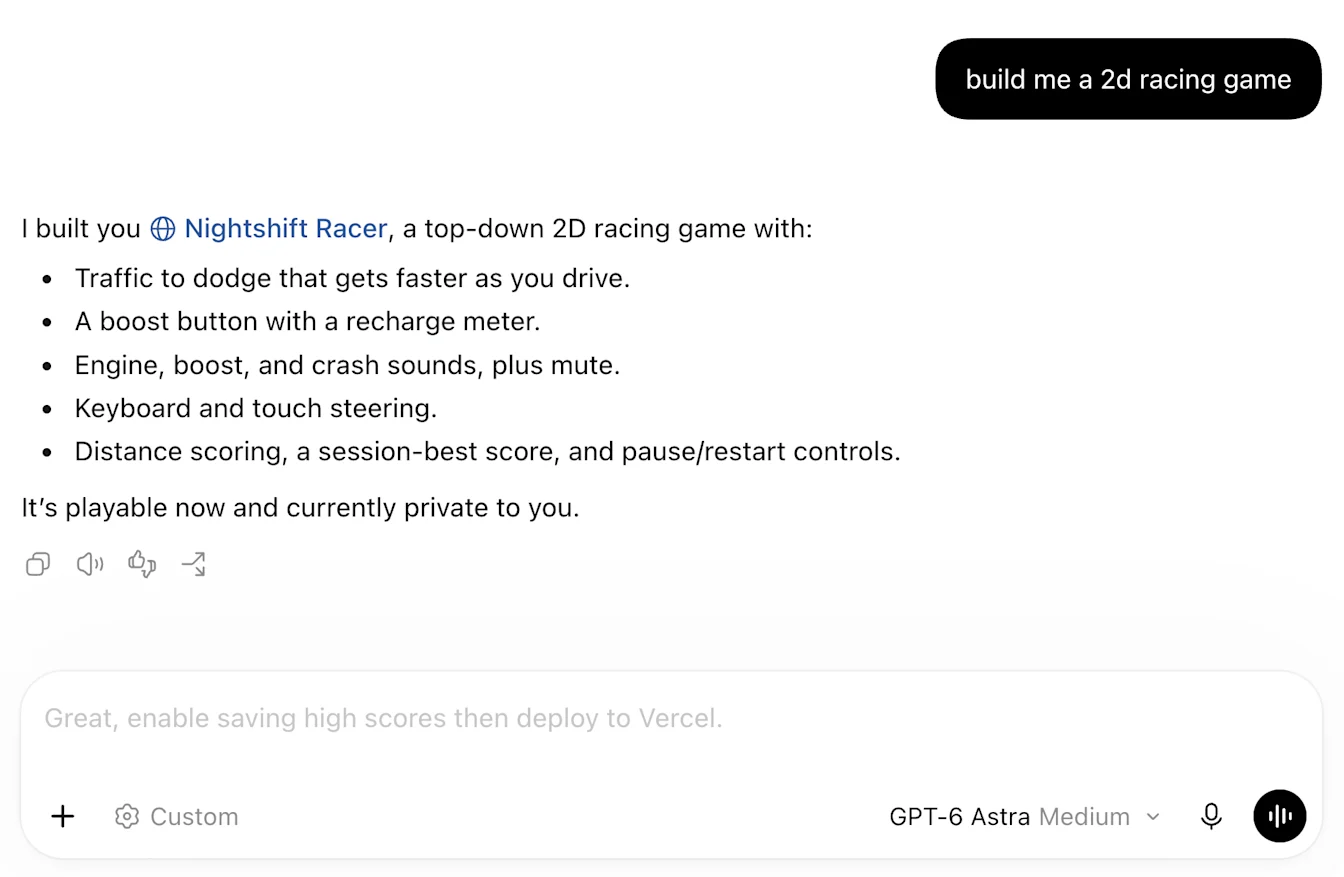
It predicts a next message; it does not continue the task by itself
OpenAI launched Composer predictions in beta on October 9. After Codex finishes a response, the composer may show a complete follow-up message derived from the current thread. Pressing Tab places that text in the box; the user still reviews, edits and sends it. Codex can skip a prediction, so one will not follow every response.
This reduces repetitive prompting rather than creating an unattended loop, scheduled task or autonomous agent. For deletion, deployment, messaging or production-data changes, keep scope, acceptance criteria and stop conditions in the instruction you actually send.
Access is narrow, and prediction cost is separate from execution
The beta is for adults on personal ChatGPT Pro accounts in supported regions using the latest Codex desktop app. It supports GPT-6 Astra and GPT-6.1 Sol in local and SSH threads. Ordinary Chat, web clients and other plans are outside the current release.
Generating a prediction does not consume Codex credits or count against usage limits during beta. Once a suggested message is sent, the resulting task follows normal usage limits and billing. Free prediction text does not mean free execution.

It uses current-thread context, so validate a small task first
Predictions use the current conversation. Past work or connected-app information can influence a suggestion only when already present in that thread; the predictor does not independently retrieve memories or query connected apps. Long threads can make suggestions slower or less aligned.
Complete a three-step local task without sensitive data and check whether the suggestion repeats work or expands file and tool scope. After Tab, rewrite it with a filename, test command and stop condition. Our ongoing-task, activity-log, reusable-Skills and privacy guides cover those checks. No independently reproducible community test was found in this window.
Source notes
Event date and our publication date are shown separately. Community reports describe individual experiences.