
MUSE RADAR / EVENT BRIEF
Google Maps Releases Portable Agent Skills for Gemini, Claude and Other Assistants
Google Maps Platform published Agent Skills documentation and an Apache-2.0 repository on October 7. The current google-maps-platform Skill covers maps, places, addresses, routing, 3D, geofencing and environmental data, installs through Skills CLI or Gemini CLI, and complements the Code Assist MCP server.
This is a development knowledge package, not universal access to Maps data
Google updated its documentation on October 7 with a google-maps-platform Agent Skill. It packages implementation knowledge for Web, Android, iOS and Web Services APIs across maps, places, addresses, routing and ETA, 3D, Street View, geofencing, heatmaps and environmental data.
The Skill provides instructions, recommended patterns, scripts and error-handling guidance through progressive disclosure. It does not grant access to a Google Cloud project, API key, billing account or production data.
One repository can be installed in several assistants
Google lists Gemini, Cursor, Windsurf, Copilot and Claude. The general command is npx skills add googlemaps/agent-skills; Gemini CLI can install the repository as an extension, with additional paths for AI Studio, Antigravity, Claude Code, Replit and Lovable.
The repository is Apache-2.0 licensed, while its README says it is not an officially supported Google product and is not eligible for Google's OSS Vulnerability Rewards Program. Open source maintained by a Google team is not an enterprise support promise.
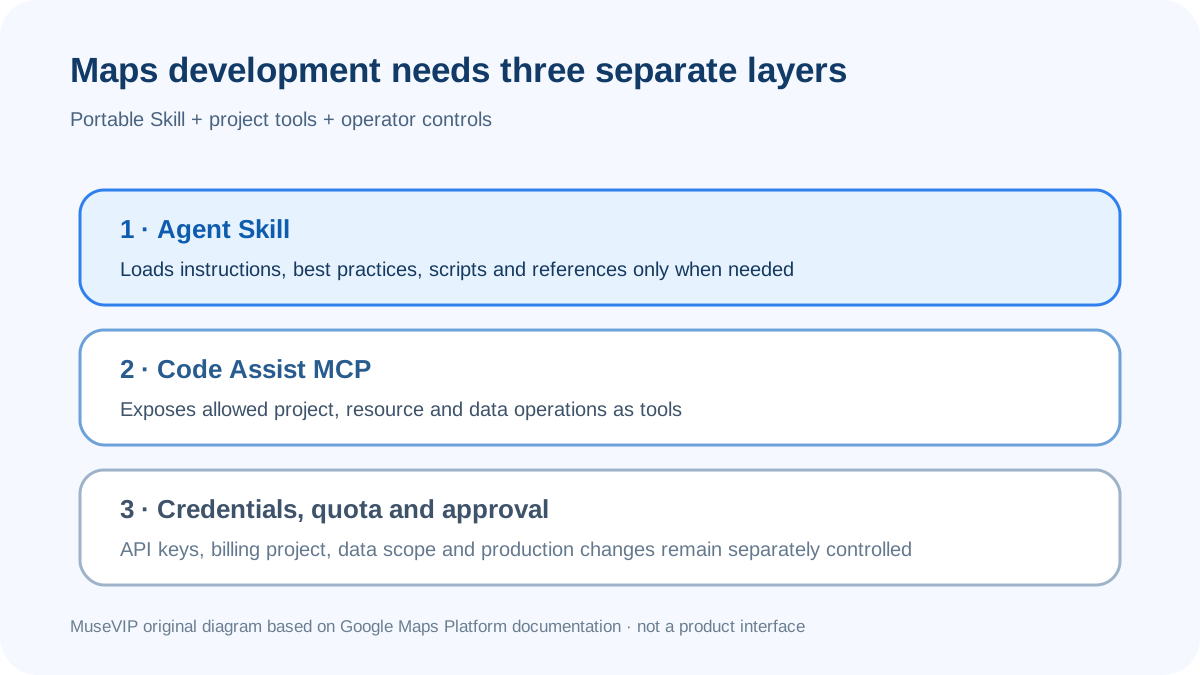
Validate the Skill and MCP layers separately
Google describes the Skill and Code Assist MCP as complementary. The Skill supplies just-in-time guidance; MCP exposes project, resource and data operations as tools. Verify SDK version, MCP scope, account, API key, quota and billing project separately.
Start with dummy coordinates for a static map or Place Autocomplete on a test page. Review API choice, error handling, key placement and request count before real location data. Our Skills, MCP, privacy and activity-log guides cover those checks. No independent reproduction was found in the window.
Source notes
Event date and our publication date are shown separately. Community reports describe individual experiences.