
This guide focuses on “Muse Typeform tutorial” and turns the question into practical steps you can check.
01 | Start with the responses, before asking for a polished report
A fluent summary can conceal an incomplete export. If the file has no open-text answers, or a connector returned only its latest batch, the analysis already has a problem before Muse starts writing. Establish what you actually have first.
This workflow was prepared from Typeform documentation and the community connector implementation. It was not tested against a live customer account. The deliverable is a feedback brief with traceable evidence. It does not change the survey or send messages.
If your current Muse account can read uploaded CSV or XLSX files, use an authorized export. Otherwise prepare a small, de-identified table in your spreadsheet application and provide the necessary fields. Stop if the data cannot be read reliably. Broad workspace access is unnecessary for this first pass.
02 | Export the Responses table, and check a known open-text answer
On a desktop, open the form and find Results, then Responses. Use the visible export control for CSV or XLSX. Record the form, export time, filters, selected rows, and expected count. Open the downloaded file before handing it over.
The Response summary export is a different product. Typeform states that its summary CSV and PDF exclude open-ended text. For comments about confusing setup or missing functionality, inspect the original response export and confirm that one known long answer is present in full.
Refresh the Response summary before comparing numbers; it does not update live. Keep the reporting interval and response state consistent. A file exported yesterday will not include submissions that arrived today.
- Check a known long answer.
- Record selections and filters.
- Preserve the original export and work on a separate copy.
03 | A community connector’s first batch is not the whole survey
An already reviewed, working custom connector can be another route. The muse-connectors Typeform skill is a community project marked Draft, with an explicit note that it has not been tested end to end. This guide does not present it as a Meta-native Typeform integration or invent an installation button.
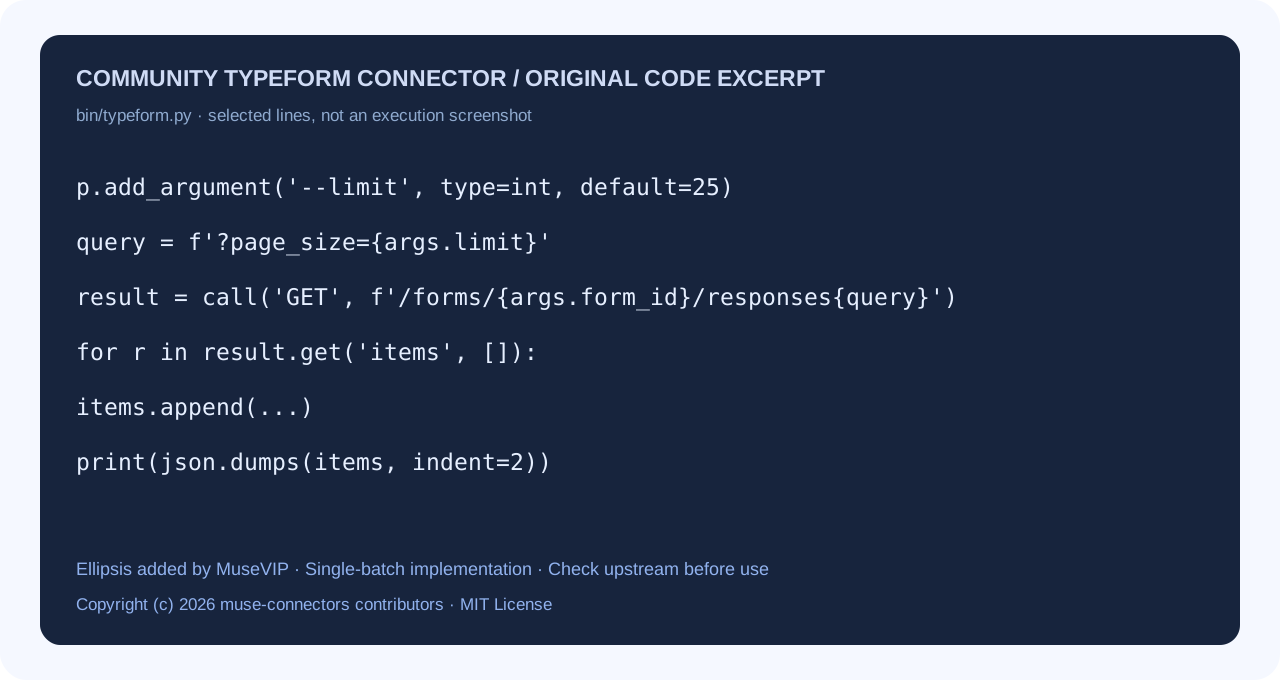
In the reviewed implementation, responses defaults to a limit of 25 and outputs the returned items without a pagination loop. Seeing 25 rows therefore says nothing about the total survey size. Prefer a complete desktop export, or have a developer retrieve and reconcile all batches using the current API specification.
Typeform warns that submissions from roughly the last 30 minutes may not yet appear in Responses API results. A periodic review can tolerate a documented freshness gap. Real-time delivery needs a separate webhook workflow and receiver; do not add one just to fix an incomplete summary.
Enter a token only through a trusted, dedicated credential flow if your environment provides one. Otherwise use the export route. Typeform offers scope selection when generating personal tokens; request only the read capabilities this task needs. Keep the token out of prompts and screenshots.
04 | Define the sample and remove fields the analysis does not need
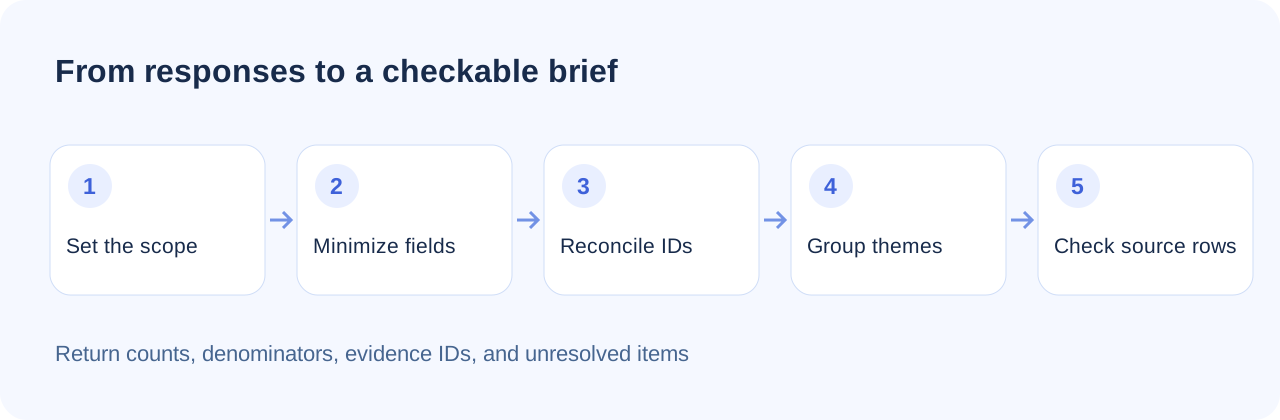
Choose a concrete question such as where new users struggle during signup, import, or export. Set the interval and time zone before analyzing. Do not allow the question to drift simply because some answers are easier to classify.
Retain question labels, answers, submission time, and a stable row number or response ID. Remove unnecessary names, contact details, payment information, and attachment links from the analysis copy. Free text may contain personal information even after dedicated contact columns have been removed.
For API batches, use response IDs to deduplicate overlapping retrieval windows. Distinct responses from the same person are not automatic duplicates. If a spreadsheet lacks a reliable response ID, preserve row numbers and flag suspected repeats for human review.
05 | Ask for an evidence table before an executive summary
Adapt this request. Analyze only the attached de-identified Typeform responses for [interval and time zone], including [completed submissions only]. First report input rows, usable responses, exclusions, and missing fields. Stop if the counts do not reconcile.
Group comments around [signup, import, export]. Allow multiple themes per response. For each theme, return the response count, denominator, supporting row numbers or IDs, and the text that supports your interpretation. Keep respondents’ statements, your summaries, and proposed actions separate. Record missing, unclear, and positive answers separately.
Finish with three issues worth investigating and the additional evidence each needs. Do not open attachment links, contact respondents, edit the form, or create a webhook. Do not infer identity or treat one person’s account as a universal result.
Try ten de-identified responses first. This checks whether the classifications and evidence references make sense. It does not establish a representative percentage for the full survey.
06 | Name the denominator and allow themes to overlap
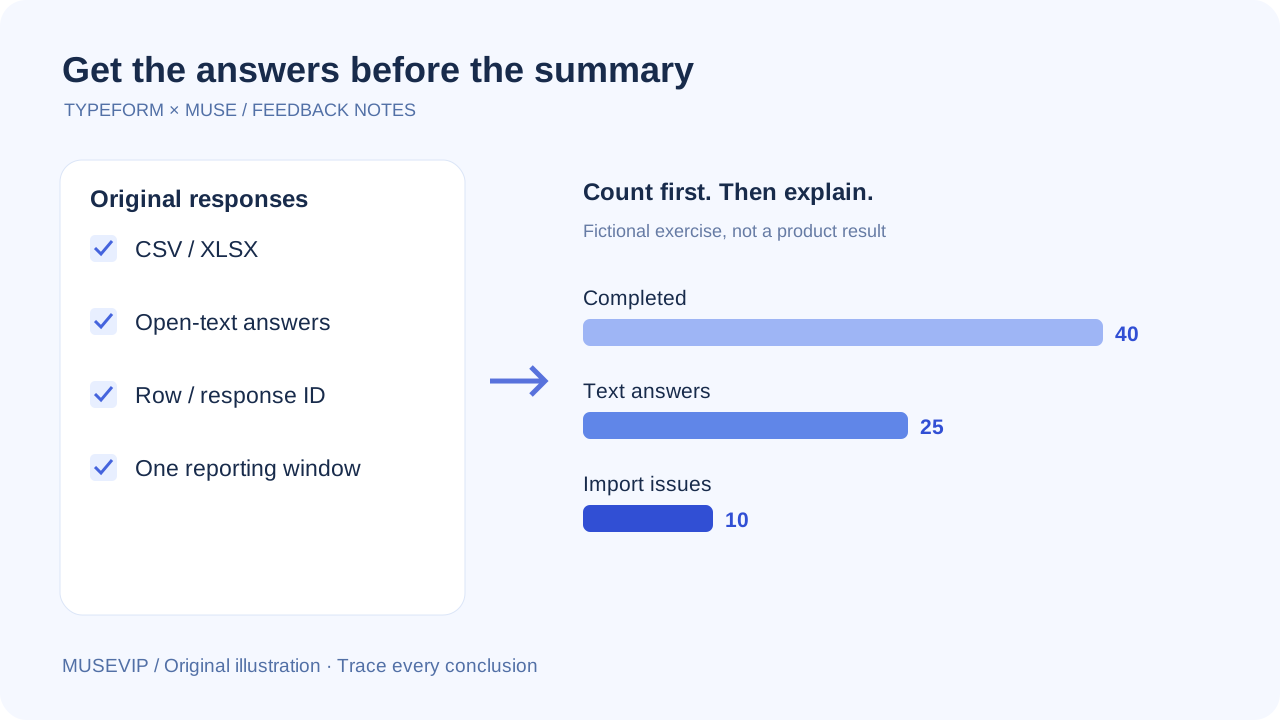
Use this fictional exercise. A dataset has 40 completed responses, of which 25 include an open-text answer. If ten mention import trouble, that is 40 percent of written answers and 25 percent of completed responses. Both calculations are valid for different questions. State which population a chart uses.
A respondent may mention both import trouble and slow export. With multiple labels, theme counts can exceed the number of usable responses. Label the method rather than forcing each answer into a single category to make percentages add up to 100.
Review comments classified as problems and some left out of the main themes. Phrases such as “I had no import problem” contain the keyword but reverse its meaning. Check negation and context against the original answer.
07 | Keep a reusable analysis copy, theme table, and one-page brief
Save those three outputs. Put the reporting scope and usable sample size at the top of the brief. Attach evidence IDs to conclusions, and list uncertain classifications, unavailable data, and follow-up questions.
For the next reporting period, retain the same classification rules and note any changed questions or filters. A new question or response source changes the comparison; explain that before drawing a trend line.
Continue with the small-business weekly brief to combine this with other business records, or the source-checked PDF workflow for a shareable document. Check the final brief for personal information before sharing it.
References
These sources support the product information in this guide. Musevip is an independent publication and is not affiliated with Meta.
- [1] Typeform | Export your responses
- [2] Typeform | Export your Response Summary to CSV or PDF
- [3] Typeform | Retrieve responses
- [4] Typeform | Personal access token
- [5] Typeform | Your Response summary
- [6] Community muse-connectors | Typeform skill and implementation
- [7] Meta AI Research | Muse safety design