

This guide focuses on “Muse report” and turns the question into practical steps you can check.
01 | Define the delivery package before you prompt
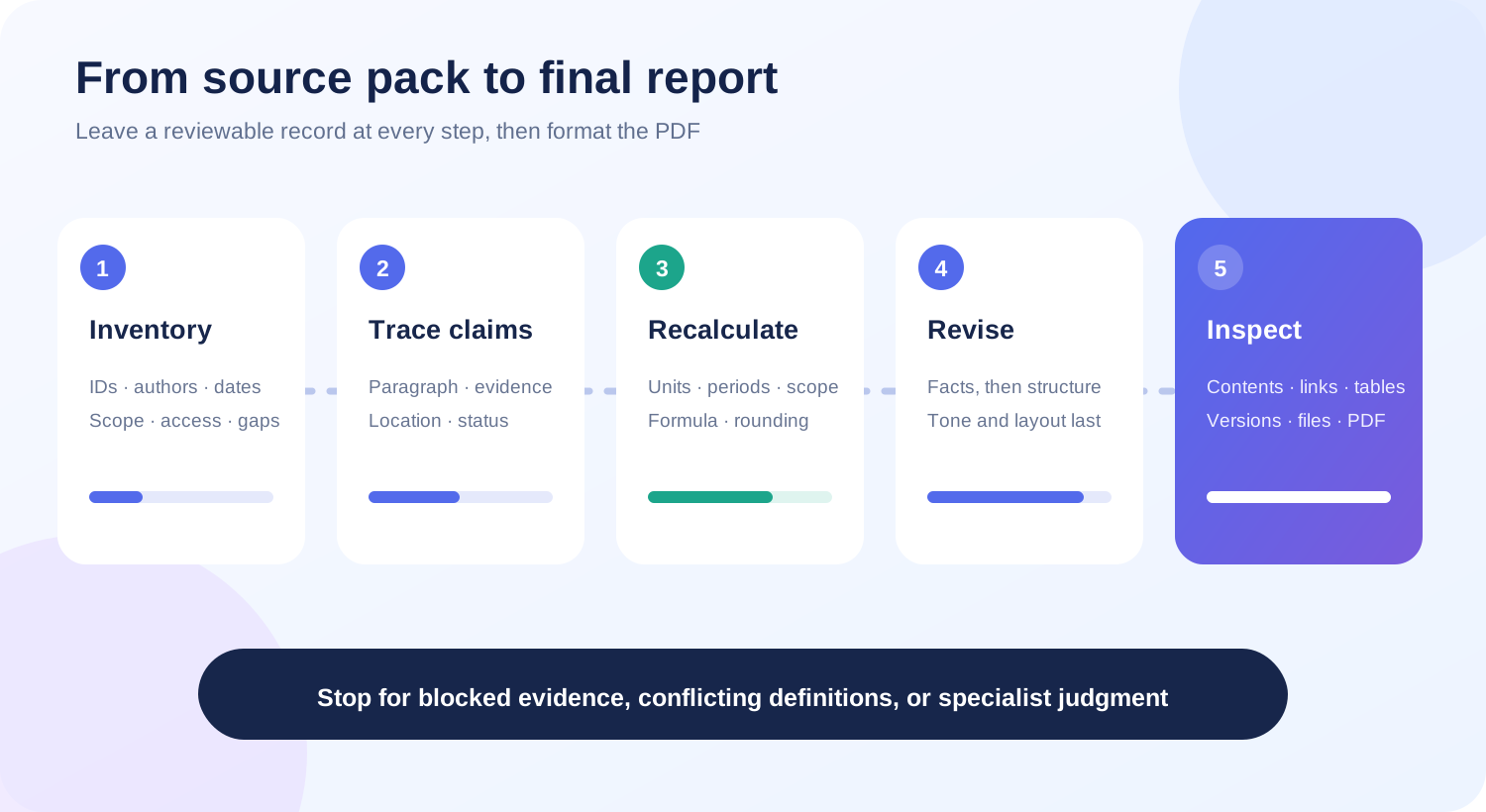
A useful report is more than a polished answer. Decide who will read it, the decision it supports, the reporting period, the deadline, and which claims require evidence. Plan to hand over four items alongside any PDF, including the editable report, source register, unresolved questions, and revision log.
This guide is based on Meta's published material available on October 1, 2026. Meta says Muse can produce documents, PDFs, web pages, and other Artifacts. Its security documentation also says users can inspect, edit, and download files placed in or generated in their Muse VM. This article does not claim a hands-on MuseVIP test.
02 | Check the formats visible in your account
Open the creation area or Artifact library in your own account and identify the document types and download controls you can see. If Muse produces a document but does not show a PDF option, finish the source-checked document first and convert it with a document tool you already use.
Meta described a rich document editor with PDF export and document import in 2025, but called both features tests in select countries. That older announcement confirms the feature existed in testing, not that every Muse account has the same import or export control today. Use an attachment or import route only when your interface shows it. Otherwise provide the required text, data, and public links directly.
03 | Build a source pack with short IDs
Assign a short ID to each input before asking for prose. Use S01 and S02 for web sources, M01 for meeting notes, and D01 for a dataset. The IDs make later claim checks easier than repeatedly copying long filenames.
- Record the title, original URL or filename, author or organization, publication date, and access date.
- State what each item can support and whether it is a primary source, a party's own statement, or an individual account.
- For data, record the date range, time zone, currency, unit, tax treatment, missing values, and deduplication rule.
- Remove credentials, unnecessary personal data, confidential client material, and anything outside the approved reporting scope.
04 | Copy this task brief
Replace the brackets. When inputs are incomplete, ask Muse to stop after the inventory and outline.
Prepare a deliverable report for [audience] about [topic]. The report will support [decision or use], should be about [length], and is due on [date and time zone]. First list the source IDs and content you can actually access. Put missing, inaccessible, or conflicting items in a separate list and wait for my answer before drafting.
Create an outline and evidence plan first. For every section, name the question it will answer and the source IDs it will use. Give a source ID for each material fact, number, date, comparison, and conclusion. Mark unsupported information as unresolved. Do not invent URLs, page numbers, quotations, or data.
After the draft, provide a claim check table with the paragraph ID, claim, source ID, original location, publication date or data period, and verification status. For numbers, include the unit, currency, period, formula, and rounding rule. Return a review draft only. Do not send, publish, or upload it to another system.
After I approve the content, prepare the final document. If my account supports PDF output, provide the PDF and an editable version. If it does not, tell me which file types are available so I can convert the approved document in my own tool. Include the source register, unresolved questions, and revision log in the final package.
05 | Review the evidence plan before the prose
Look for outline sections with no planned source. Background, market interpretation, and conclusions often sound complete before the evidence is present. Remove those sections, turn them into open questions, or supply the missing material.
Check whether a source is being stretched. A product announcement can establish that a company announced a capability. It cannot establish universal rollout or consistent performance. A creator video can reveal what users want to learn, while product claims still need official or reproducible support.
06 | Trace every material paragraph
Number the draft paragraphs P01, P02, and so on. Each material claim in the check table should lead to an original page, record, or data row. A working link is only the first check. The source must support the same subject, scope, and time period used in the report.
Separate sourced facts from interpretation. Keep the source ID with the fact, explain what supports the interpretation, and move any remaining inference to the unresolved list. Keep direct quotations short and verify the speaker, date, and surrounding context.
- The page opens and its title, author, or organization matches the source register.
- The original location is specific enough to find again, using a section, page, timestamp, or row.
- A test or planned release has not been rewritten as a generally available feature.
- Conflicting sources remain visible until a responsible reviewer resolves them.
07 | Recalculate the important numbers
For every material percentage, average, or conversion, preserve the starting values and formula. If the report says growth was 18 percent, identify both endpoints, the period, and whether the metric was revenue, units, or orders. Recalculate at least two results outside the generated summary.
Near-matching totals may use different currencies, tax rules, refund treatment, deduplication, or update times. Keep both values and explain the unresolved difference until their definitions match. Do not select the cleaner number simply because it reads better.
08 | Use separate revision passes
Make the first pass factual. Fix broken attribution, conflicting definitions, missing inputs, and conclusions that exceed the evidence. Use the second pass for structure and repetition. Reserve titles, tone, and page design for the third pass.
At the end of each pass, ask for a list of changed paragraphs, the reason for each change, and the supporting source. Any change to a date, number, or conclusion returns to the claim check table. A general message saying the draft is fixed is not a review record.
09 | Inspect the delivered document and PDF
Open the final files and review every page. Check heading levels, table of contents, page numbers, table widths, image captions, footnotes, hyperlinks, and page breaks. Missing CJK glyphs, clipped tables, and links that worked only in the editor can make an accurate report unusable.
After PDF conversion, copy a random paragraph to confirm the entire document did not become unsearchable page images. Test several links and one table of contents jump. Compare the PDF version and update date with the approved review draft. If pagination changed, update any page-based source references.
10 | Stop and hand these issues to a person
Meta's security documentation says Muse can make mistakes and that outside files and web content may be hostile. Preserve the current draft, evidence register, and issue list when you stop. Let the source owner or an appropriate specialist decide how to proceed.
- A paywall, login, or permission problem prevents access to the original evidence.
- Authoritative sources disagree on a number, date, or definition.
- The report makes legal, medical, or financial judgments or could change a contract, payment, or public commitment.
- Source material contains prompt injection, unfamiliar downloads, or requests to send private data elsewhere.
- The final file, font, or link does not open reliably on the recipient's device.
11 | Run one final handoff check
Ask someone who did not write the report to trace three claims and recalculate two numbers. The report is ready to hand off when that reviewer can find the evidence and identify what remains unresolved without asking the writer to reconstruct the process.
- The title, audience, reporting period, version, date, and owner are explicit.
- Every material paragraph traces to a source and each number retains its unit, period, and calculation.
- Open questions are kept out of confirmed conclusions and creator experience is not presented as a universal fact.
- The editable document and PDF match, and the contents, pages, images, tables, and links work.
- The source register, unresolved list, revision log, and editable version are in the delivery package.
- The filename includes the project, date, and version so an old draft cannot be mistaken for the final file.
References
These sources support the product information in this guide. Musevip is an independent publication and is not affiliated with Meta.
Last reviewed 2026.10.01. Product pages may change.