

This guide focuses on “compare service plans with Muse” and turns the question into practical steps you can check.
01 | Don’t compare only the monthly price
The monthly fee is usually the biggest number on a plan page. But the total can depend on when an introductory price ends, whether you must sign a contract, how installation is charged, and how much notice you need to cancel. If you ask Muse ‘Which one is the best deal?’ it may just rank the visible prices.
A safer way is to narrow the options and put the same details side by side. The method works for internet, mobile, memberships, and software subscriptions. Prices and terms change, so check the provider’s official pages before deciding.
02 | Start with what you actually need
Write down the use case and minimum requirements: how many people will use it, approximate monthly usage, must-have features, how long you expect to need it, and your general area. Separate hard requirements from nice-to-haves.
For home internet, you might specify your region, the speed you need, whether you need a router, an expected 12-month term, and that the budget means total cost including installation. Don’t give Muse account credentials, your full address, phone number, or payment details. A general service area is usually enough for an initial shortlist.
03 | Put every option in the same table
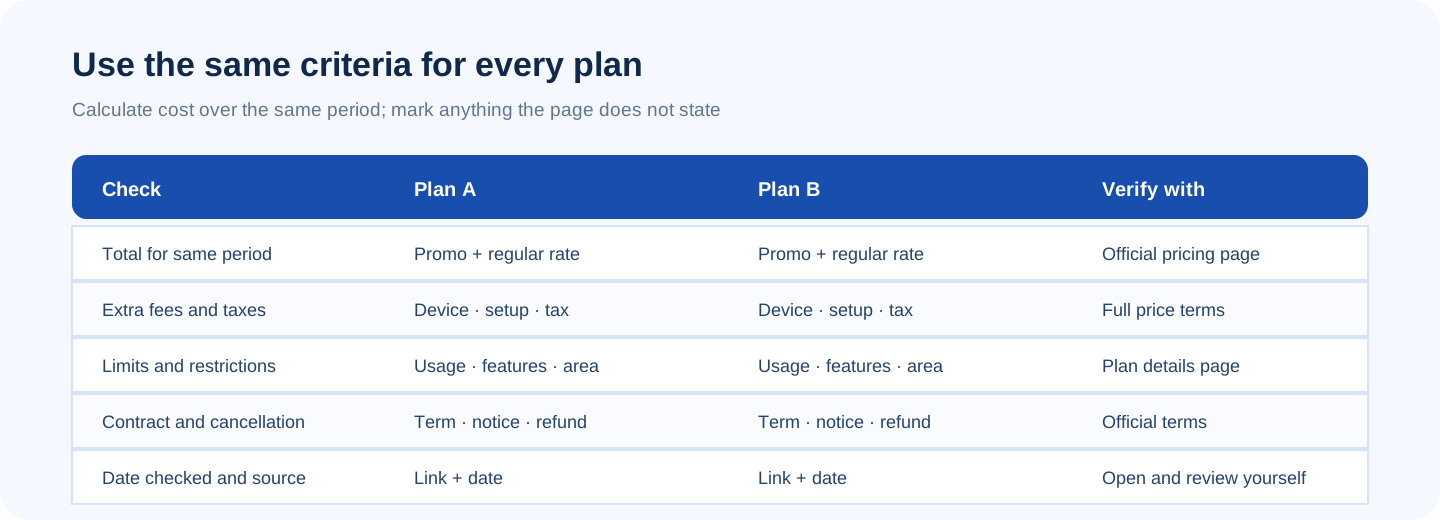
Ask for the same fields for each plan: official page, date checked, introductory monthly price, post-promotion price, contract length, one-time fees, taxes, usage caps, key restrictions, and cancellation method. If the page is silent, write ‘not stated’ instead of guessing.
Compare over the same period. If you are looking at 12 months and a discount lasts for six, add the remaining six months at the regular rate. A number that leaves out taxes, installation, or equipment is not the final total.
04 | Break ‘good value’ into things you can compare
- Cost: calculate the total over the same period; show promotional and regular rates separately.
- Limits: data, speed, number of devices, location, feature tier, or fair-use terms.
- Flexibility: contract length, auto-renewal, early cancellation fees, refund window, and notice period.
- Support: service hours, outage support, and whether equipment or installation costs extra.
- Evidence: official page and date checked. User reviews can add context, but they do not replace contract terms.
05 | Ask for trade-offs, not a mystery winner
Have Muse show two views: which option meets your needs at the lowest total cost, and which one is easiest to cancel or offers the support you care about. The trade-offs are more useful than an unexplained ‘best plan’ label.
Ask it to list the assumptions behind each suggestion. For example, a plan may only make sense if your usage stays below a cap, you keep it for the full promotional period, or installation is available in your area. If an assumption is wrong, the recommendation can change.
06 | Verify the quote and contract yourself
Open the provider’s official offer page and check your region, eligible customer type, promotion end date, and full terms. Look for new-customer pricing, required auto-renewal, the cancellation notice period, and equipment fees. The US FTC’s consumer guide also recommends checking the charges, renewal, and cancellation process for free trials and recurring subscriptions. In other regions, check local provider terms and consumer guidance.
If the page asks for a login, identity details, payment method, or order submission, stop and take over yourself. Meta says Muse can work with webpages and forms and may ask before certain sensitive actions. That does not make every provider’s terms, confirmation step, or connector the same. Verify the amount and permissions shown on the page you are using.
07 | Copy this comparison prompt
Fill in the brackets and keep the first pass read-only. Don’t ask an agent to sign you up or start a subscription.
- Compare public [service type] plans for [general region]. I need [use case and minimum requirements] and expect to use the service for [period].
- Review [official candidate links/providers I name]. For every plan, list the date checked, promo monthly fee, post-promo price, total cost for the period, taxes and one-time fees, usage limits, contract, and cancellation/refund terms.
- Use official plan or terms pages and link each row to its source. Put customer anecdotes in a separate notes section; do not present them as provider commitments.
- Mark details the page does not state as ‘not stated.’ Do not estimate. Show separate options for lowest total cost and easiest cancellation, and explain the assumptions.
- Research public information only. Do not sign in, enter personal or payment details, contact the provider, register, renew, or order. Stop and ask me if those steps are required.
08 | Three final checks
First, make sure every option uses the same time period. Next, rule out plans that miss your must-haves. Then check the provider’s official terms for when the price changes and how to cancel. The result is not an AI ranking that decides for you; it is a comparison you can understand and verify.
References
These sources support the product information in this guide. Musevip is an independent publication and is not affiliated with Meta.
Last reviewed 2026.09.27. Product pages may change.