

This guide focuses on “Muse travel planning” and turns the question into practical steps you can check.
01 | Don’t start with ‘Plan my trip’
It sounds clear, but it leaves a lot open: which dates, how flexible you are, where you want to stay, whether the budget includes flights, and whether you want research or are ready to book. If those details are missing, the itinerary can look polished and still miss what matters to you.
A better first step is to ask Muse to build a shortlist. Meta’s public materials describe travel planning and bookings as part of Muse’s direction, but the Meta Connect announcement said the Expedia integration was coming soon. Availability and what it can do depend on your region, account, and the current interface.
02 | Give it the details once
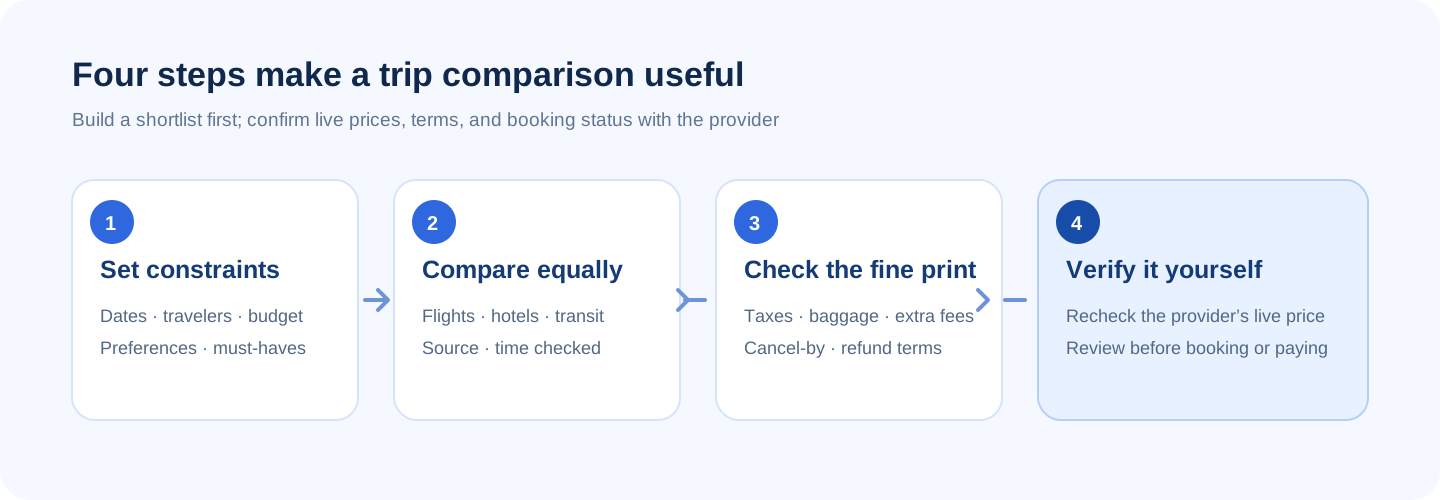
Include dates, travelers, budget, and non-negotiables. Split the budget into flights, lodging, and local transport, or say that your total includes taxes and fees. If your dates can move, give a window rather than a single day.
For example: ‘Two of us are planning five days in Tokyo in October. Our dates can shift by two days. Keep lodging under $150 per night near a train station. We prefer a daytime arrival, no red-eyes, and no more than one connection. Research public information only: do not sign in, enter passport or payment details, or book. Repeat my constraints before searching.’
03 | Compare options using the same fields
Don’t let one option be the cheapest flight and another a premium hotel bundle. Ask for the same fields for every option: source page, time checked, total price with taxes, departure and arrival times, transfers and baggage, hotel location, cancellation terms, and anything it could not verify.
A result that was available a moment ago may have changed. Seats, room rates, taxes, and discounts move around. Open the provider’s page and check again. If a detail is hidden behind a sign-in or the page will not load, ask Muse to mark it unverified instead of filling in a guess.
04 | The fine print can change which option is better
- Flights: Is checked baggage included? Is seat selection extra? Does a connection require collecting bags again? How easy is it to get from the arrival airport to town?
- Hotels: Does the rate include tax and breakfast? Are there deposits, resort fees, or cleaning charges on the next page?
- Cancellation: What is the free-cancellation deadline and time zone? How long does a refund take? Does ‘refundable’ come with conditions?
- Itinerary: Do opening hours, transit times, and intercity travel actually fit on the same day? Is there room for rest or delays?
- Evidence: Which provider page supports the price and policy, and when was it checked? Flag anything the page does not make clear.
05 | Turn the shortlist into an itinerary you can check
A useful itinerary is not just a packed list of attractions. Ask Muse to organize each day into morning, afternoon, and evening, with estimated travel time, reservation needs, a backup option, and a source for time-sensitive details. Leave breathing room, especially on arrival days, intercity travel days, or trips with older relatives or kids.
Then sanity-check the order: how long from the hotel to the first stop? Is the attraction open that day? Is there a way back? If it closes or rains, what is nearby? It is more useful to have Muse flag what you need to verify than to make every detail sound settled.
06 | Pause before bookings, payments, or passport details
Trip planning and a booking integration are not the same thing. Even if your account can open a travel service, read the permission screen to see what it can access or submit. Stop at a login, CAPTCHA, passport request, payment, or final booking button. Check the domain, traveler names, dates, total, and cancellation rules yourself.
Meta says Muse asks for approval before sensitive actions such as sending an email or making a purchase; that does not mean every travel service uses the same booking flow. The prompt and available integrations depend on what your account currently shows. Don’t paste card numbers, one-time codes, or unnecessary identity details into chat. If you do not see clear official permissions and a final review screen, keep the task at research.
07 | Copy this travel-planning prompt
Replace the brackets with your details. Start with read-only research, review the options and terms, then decide whether to continue.
- Help me compare trip options for [destination] during [date range]. We are [number and traveler needs]. Our budget is [total or separate budgets], and dates can shift by [range].
- Flight preferences: [origin, arrival time, baggage, connection limits]. Lodging: [area, room needs, transit, nightly limit].
- Compare three options using the same fields: provider page, time checked, total including taxes, flight times/baggage/transfers, hotel location/extra fees, cancellation and refund deadlines.
- Mark anything you cannot verify from a page as ‘unverified.’ Do not turn an estimate into a confirmed price; separate facts from suggestions.
- Research public information only. Do not sign in, enter passport or payment details, contact a provider, submit an order, or book. Pause and explain if any of those steps are required.
- Finish with a relaxed day-by-day itinerary, estimated travel times, opening hours to verify, reservations needed, and a rainy-day alternative.
08 | The short version
Treat Muse as a research assistant that can help narrow the options: explain your constraints, compare everything on the same terms, then revisit the provider pages to confirm the live price and cancellation policy before you book. Check Meta’s current information and your account instead of relying on social screenshots to decide whether travel integrations or booking are available to you.
References
These sources support the product information in this guide. Musevip is an independent publication and is not affiliated with Meta.
Last reviewed 2026.09.27. Product pages may change.