
This guide focuses on “Muse restaurant booking” and turns the question into practical steps you can check.
01 | Trying to book is not the same as having a table
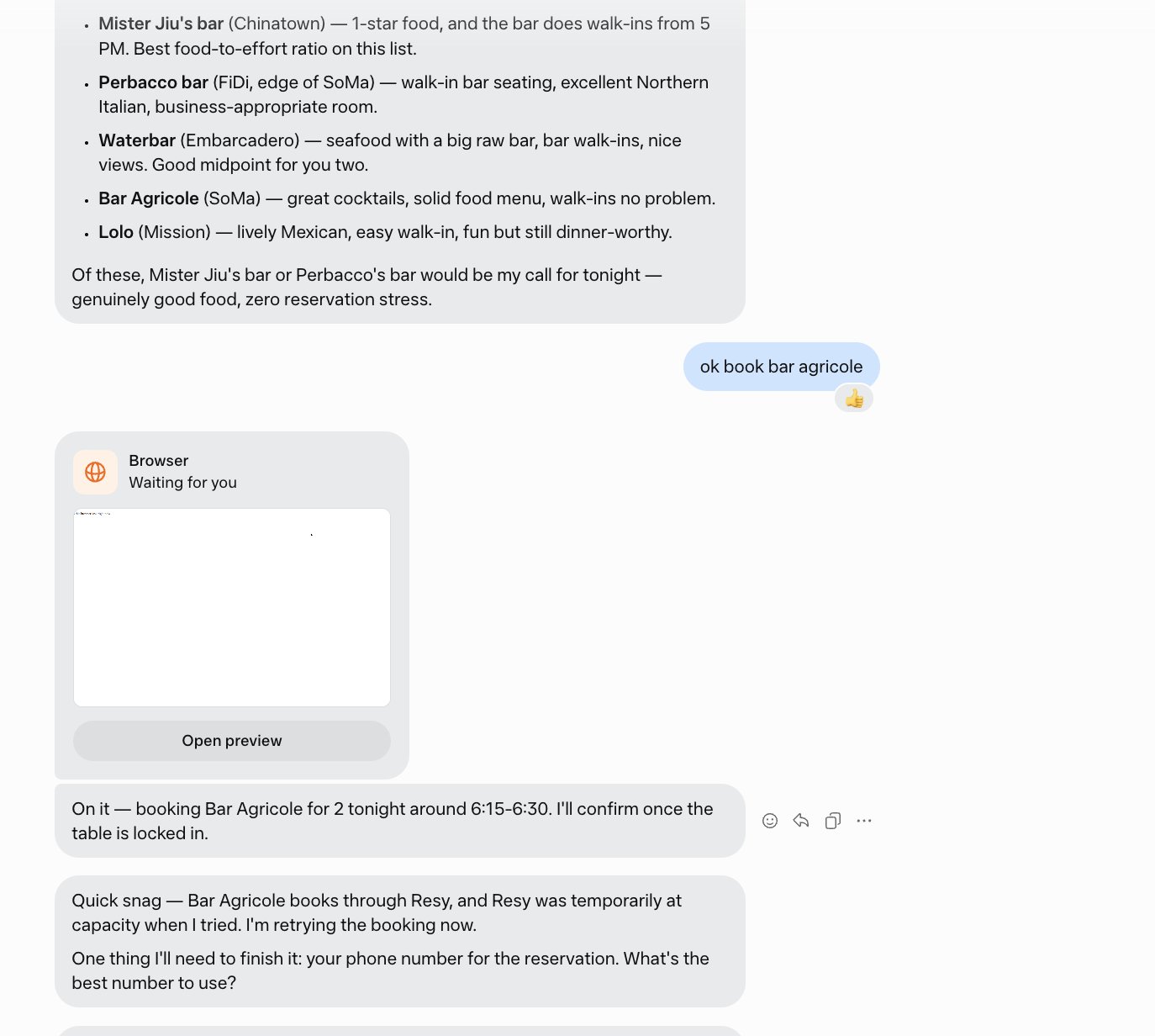
X user @pitdesi posted about a dinner request in which Muse suggested Bar Agricole, then started a browser booking attempt after the user chose it. The author later said the venue had already closed. The screenshot shows suggestions, an in-progress browser card, and a request for a phone number after the booking service hit a problem. It does not show a confirmed reservation.
This case is a reminder to separate three questions: does the place still operate, is a table available at the required time, and has the reservation actually been confirmed? Each requires its own check.
02 | Check 1: Is this exact venue currently open?
Ask for the restaurant's own website or official social page, a recent update, today's hours, and its full address. An old best-of list or search snippet is a lead, not proof of current operations. Venues can move or change owners while keeping a familiar name.
If the official source does not establish current operations, mark the venue unconfirmed and ask for a different candidate. Do not turn a missing detail into an optimistic assumption.
03 | Check 2: Does the booking channel match the venue?
Restaurants may use their website, phone, a booking platform, or walk-ins only. Ask Muse to show the channel it intends to use and the live page. If a platform fails or the venue is absent, do not assume it is merely busy and let the agent retry indefinitely.
Return to the venue's current official channel. If that still cannot confirm a slot, move to another candidate with a clear booking path.
04 | Check 3: Review personal details and charges first
A reservation may require a phone number, email, deposit, card guarantee, or cancellation fee. Meta describes approval controls for sensitive actions, but each restaurant and platform has its own terms. Inspect venue, date, party size, time, deposit, and cancellation deadline before deciding whether to supply personal details.
The screenshot is a good pause point: the agent requested a phone number while a table had not yet been secured. Confirm that the venue and channel are valid before handing over information.
05 | Checks 4 and 5: Confirm and avoid duplicates
- Look for a real confirmation number with the correct venue, address, date, time, and party size.
- Verify it in the reservation platform, confirmation email, or message. An agent progress update is not a booking record.
- Review any deposit, preauthorization, and cancellation conditions.
- If Muse retries, check whether a first booking already exists before allowing a second attempt.
- Before leaving, check the venue's current status again; if sources conflict, contact it directly.
06 | A reservation prompt you can reuse
Fill in the brackets and keep the first phase read-only.
- Find three restaurants in [area] for [party size] at [time range] today. Budget [amount]; needs [cuisine, allergy, or accessibility requirements].
- For each, show an official site or page, full address, evidence it is open today, available time, and current booking channel. Exclude venues whose operating status cannot be confirmed.
- Research only for now. Do not log in, provide phone or payment details, or contact a venue. Once I pick one, show the exact booking page, date, price, and cancellation terms, then wait for my approval.
- Afterwards provide a confirmation number and record I can inspect. If you cannot obtain one, say clearly that the booking did not succeed.
07 | How to recover when something is wrong
If the venue is closed or the service fails, stop the current attempt. Check whether any information was submitted or any reservation created, then choose another candidate. Tell Muse whether the failure was stale information, a wrong address, no availability, or a broken booking page so it checks that condition earlier next time.
Meta describes browser-based tasks and approvals. The lesson from this user's case is to define success as something verifiable in the original service, not as a confident status message in chat.
References
These sources support the product information in this guide. Musevip is an independent publication and is not affiliated with Meta.
Last reviewed 2026.09.28. Product pages may change.